MICAPP
How do you run Google Search Ads? Let's learn about it together below!
First, let's take a look at how Google Search Ads are displayed.
I. Display Forms of Google Search Ads
1. Search ads can achieve cross-platform sales integration and cross-screen product distribution.
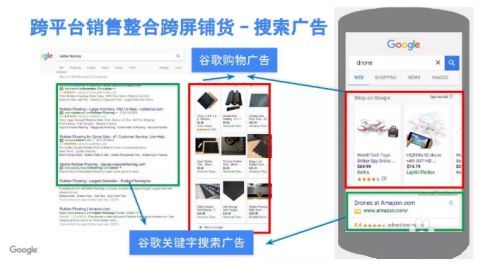
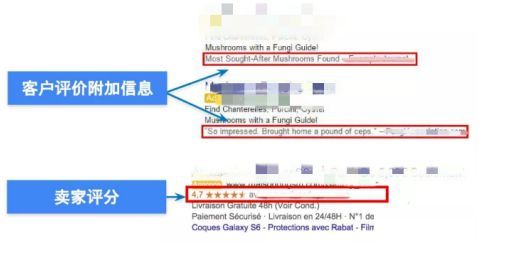
2. Search ads can also integrate authoritative third-party review information. Seller reviews from authoritative third-party review websites can be integrated into search results, highlighting reliability and achieving the effect of word-of-mouth marketing.
II. Display Positions of Google Search Ads
If users enter words that match your keywords into the Google search box on a personal computer, tablet, or smartphone, your ad can appear above the search results.
III. Steps for Operating Google Search Ads
1. Log in to your Google Ads account.
2. In the page menu on the left, click Ads & extensions.
3. Click the plus button and select the “Text ad” option.
Enter the final URL, headline text, ad description text, and the optional text in the “Path” fields.
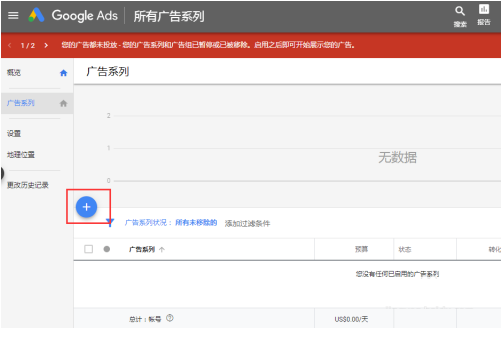
4. After entering, you can set a goal first, or choose to create an ad without goal guidance.

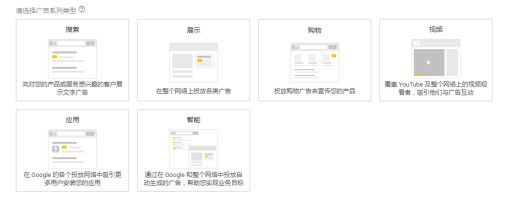
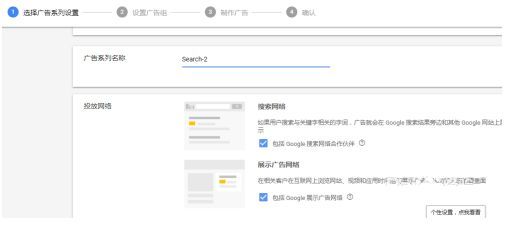
5. If you choose no goal guidance, multiple Google ad formats will appear for selection. Here we will use search ads as an example.
6. After confirming that the new text ad is correct, click Save ad.
7. For more related information, feel free to consult us!